February 21st, 2021
Shopify Inventory Management: A Practical Guide

By Chew Lim
Last reviewed: September 10th, 2026 · Reviewed by Chew Lim
Shopify inventory management is the process of keeping product quantities accurate as stock is purchased, received, adjusted and sold. Shopify provides native inventory tools, while specialist apps can add workflows for businesses managing several stores, bundles or more structured purchasing.
Most inventory problems are not really counting problems. They are timing and ownership problems: two people adjusted the same product an hour apart, a sale in one store took too long to reach another, or nobody recorded why fourteen units disappeared. The right setup depends on how many products, locations and sales channels you operate, but it always starts in the same place. Clean product data, and clear ownership of every inventory update, before you add automation.
What should a Shopify inventory process include?
A reliable process should help your team answer five questions:
- How much of each product is available?
- Where is that stock located?
- Why did a quantity change?
- What has already been ordered from suppliers?
- Which products or components need replenishing?
If those answers live in separate spreadsheets or depend on one team member, discrepancies become harder to investigate. The rest of this guide works through each question in turn.
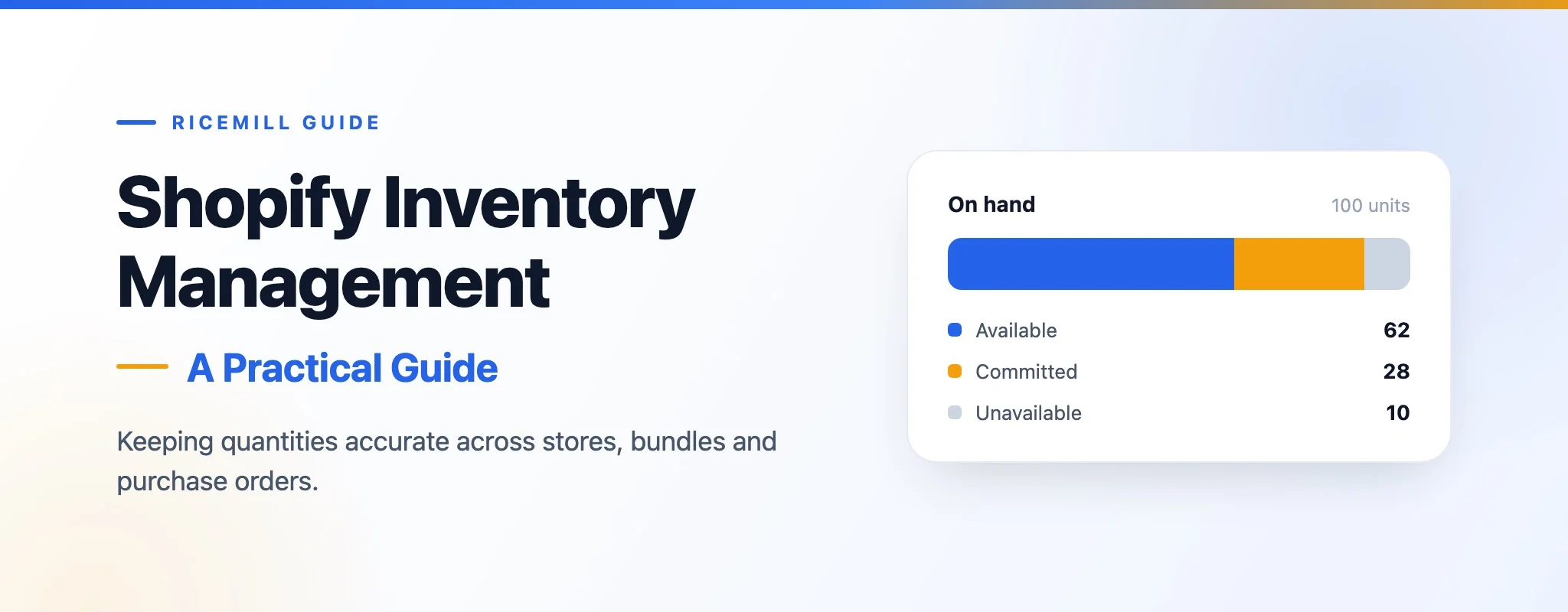
On hand, available and committed are different numbers
The most common source of confusion is treating "how many do we have" as a single figure. Shopify splits it into several states, and they rarely match.
| State | What it means | Counted in on hand |
|---|---|---|
| Available | Units that can still be sold | Yes |
| Committed | Units on placed orders that have not been fulfilled | Yes |
| Unavailable | Units held back as damaged, in quality control, safety stock or similar | Yes |
| On hand | Everything physically sitting at the location | The total itself |
| Incoming | Units on a purchase order or transfer that have not arrived | No |
A product can show plenty of stock on hand and still be almost unsellable, because most of that figure is committed to orders waiting to ship. When someone reports that "the numbers are wrong", check which of these figures they are actually looking at before adjusting anything.
Keep SKUs and locations consistent
Use a stable SKU for every inventory item and apply it consistently across connected stores. Avoid reusing one SKU for unrelated products, because an automatic update may then change the wrong item.
A SKU is an identifier, not a description. It should survive a change of supplier, packaging or price.
| Avoid | Use instead | Why |
|---|---|---|
| blue-shirt | TSH-BLU-M | Size and colour are encoded, so variants cannot collide |
| TSH-BLU-M-SALE | TSH-BLU-M | A promotion is not a different product |
| Blank or auto-generated | A deliberate code | Blank SKUs cannot be matched between stores |
| The same SKU on two products | One SKU per item | A sync will update whichever it matches first |
Locations also need a defined purpose. Decide whether each represents a physical warehouse, retail store, supplier, virtual allocation or another stock-holding point. Only connect locations that should participate in the same inventory workflow. A location that exists for accounting reasons but never holds sellable stock is better left out of the sync than mapped and then worked around.
Prevent overselling across stores
Overselling often occurs when the same stock is offered through several stores but a sale in one is not reflected quickly enough in the others.
The diagram shows the failure in miniature. Three units, two storefronts. Store A sells all three at 10:02, and until that change reaches Store B, Store B is still advertising three units it no longer has. The two it sells at 10:05 cannot be fulfilled. Nothing was miscounted; the count was simply out of date.
Inventory synchronisation closes that window. Before enabling it broadly, test a small number of products and confirm that sales, returns and manual adjustments produce the expected quantities in every mapped store. Pay particular attention to returns and cancellations, which put stock back and are easy to overlook when you only check the outbound direction.
Ricemill | Inventory supports automatic updates across connected stores and records stock movements so unexpected changes can be investigated.
Use stock-movement history as an audit trail
A current quantity tells you what is available now; stock-movement history helps explain how it got there. Review movements when investigating a discrepancy rather than correcting the number without understanding the cause.
Useful details include the time of the change, the quantity before and after, the connected channel or purchase involved and the user or process that made the adjustment. Read together, they turn "we are four units short" into an event with a time and a cause.
Suppose a shelf count finds 20 units but the store shows 24:
| Time | Change | Before and after | Source |
|---|---|---|---|
| 09:14 | +24 | 0 to 24 | Purchase order PO-1042 received |
| 11:02 | −4 | 24 to 20 | Shopify order #1187 |
| 15:40 | +4 | 20 to 24 | Order #1187 cancelled, stock returned |
The trail explains itself: order #1187 had already been picked and shipped when it was cancelled, so the four units were returned to stock in the system but never came back to the shelf. The fix is an adjustment with a note recording what happened, not a silent correction that leaves the same gap to reappear next month.
Manage bundles from their components
Bundles need a different inventory model from standalone products. Their availability should be calculated from the quantities of the components required to build them.
If a gift set requires two cups and one packet of coffee, its buildable quantity is limited by whichever component runs out first. Selling one set has to reduce every component it consumes, rather than a separate counter kept against the bundle itself.
When components are shared across several bundles, every bundle needs to reflect changes to that common stock. Selling a coffee gift set also reduces the cups available to a tasting pack that uses them, so both bundle figures have to move at once.
Ricemill | Inventory supports component-based bundles and adjusts component inventory when a bundle is sold.
Create a structured purchasing workflow
Purchase orders provide a record of what was ordered, from which supplier, for which destination and at what cost. A clear status flow distinguishes drafts from sent orders and received stock.
When receiving a purchase, record the quantities actually delivered. This creates a more reliable link between supplier activity and inventory changes than manually increasing stock without a purchase record. Partial deliveries are the case worth getting right: receiving what arrived and leaving the remainder outstanding keeps both the shelf count and the supplier's outstanding balance honest.
Give inventory review a schedule
Automation reduces repetitive work but does not remove the need for review. Rather than one long audit nobody has time for, spread the checks across a cadence your team can actually keep.
| Cadence | What to check | What it catches |
|---|---|---|
| Daily | Negative or unexpectedly high quantities | Broken mappings and mistyped adjustments |
| Daily | Unexplained stock movements | Changes made without a recorded reason |
| Weekly | Open purchase orders and supplier delays | Replenishment that has quietly stalled |
| Weekly | Bundle components approaching zero | Bundles about to become unbuildable |
| Monthly | Products without stable SKUs | Items that cannot be matched between stores |
| Monthly | Unmapped or duplicated locations | Stock counted twice, or not at all |
| Monthly | Slow-moving and excess stock | Cash sitting on the shelf |
| Quarterly | A rotating count of your fastest-moving items | Drift between the system and the shelf |
Three habits behind most discrepancies
- Correcting a number without recording why. The quantity is right for an afternoon, and the underlying cause repeats next week.
- Letting anyone adjust stock. Decide who owns adjustments and where the reason gets written down.
- Switching synchronisation on for the whole catalogue at once. Test with a handful of products, including a return and a cancellation, before going wide.
When does a specialist inventory app make sense?
Shopify's native tools may be sufficient for a straightforward catalogue and workflow. A specialist app becomes more useful when you need multi-store synchronisation, component-based bundles, detailed movement history or purchase-order management in one operational view.
| What you need | Shopify's built-in tools | Where a specialist app helps |
|---|---|---|
| Quantity per product, per location | Built in | Not needed |
| Adjusting and reviewing stock in one store | Built in | Not needed |
| The same physical stock sold through more than one store | Each store keeps its own count | Keeps mapped quantities aligned automatically |
| Bundles assembled from shared components | Workable for simple setups | Calculates buildable quantity and adjusts components on sale |
| Explaining a quantity change from last month | History is limited in depth | A detailed movement record, including the source of each change |
| Ordering and receiving from suppliers | Transfers cover basic movement | Purchase orders with supplier, cost, destination and receiving status |
Common questions
Does Shopify prevent overselling on its own?
Within a single store, Shopify reduces available stock as orders are placed. The risk appears when the same physical stock is offered through more than one store or channel, because each holds its own count until something reconciles them.
What is the difference between on hand and available?
On hand is everything physically at the location. Available is what remains once committed and unavailable units are set aside. Available is the number that decides whether a customer can complete a purchase.
How often should stock be counted physically?
Often enough that a discrepancy is still explainable. Rotating through your fastest-moving items on a regular cycle usually surfaces problems earlier than an annual full count, and does not require closing the warehouse.
When should we move off spreadsheets?
When the spreadsheet stops being where changes happen. Once stock moves through several channels, a spreadsheet tends to record history after the fact rather than drive the process, and the gap between the two is where overselling lives.
Explore Ricemill | Inventory to compare its current inventory, purchasing and bundle features, or read how Ricemill's two Shopify apps solve different problems.