Ricemill Group Pty Ltd
Warehouse App - Help Center (Deprecated)
  1. Warehouse App
  2. Couriers
  3. How to calculate shipping rate

In this article:

  1. How to calculate shipping rate

Related articles/videos:

  • How to export couriers consignment file
  • MyFastway consignment export settings
  • How StarTrack Integration Work
  • Setting Up Australia Post eParcel Integration
  • How to remove eParcel label from pending Australia Post manifest
  • How to update courier's rate via CSV
  • Import tracking number from eParcel Online Portal
  • How to set default delivery option for eParcel
  • How to setup Australia Post Satchel rates
  • How to fill in csv file for Australia Post rate import
  • eParcel consignment import Issues
How to calculate shipping rate

Last updated: April 29th, 2024

In this article:

  1. How to calculate shipping rate

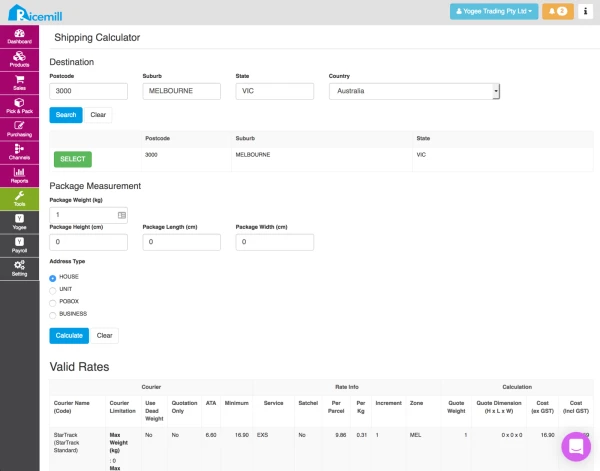
How to calculate shipping rate

  • Go to Tools->Shipping Calculator
  • Enter postcode and click "Search"
  • Select the matching suburb from the result
  • Enter package weight
  • [Optional] Enter package dimension
  • Select Address Type
  • Click "Calculate"