
One stock pool, two Shopify stores: keeping inventory in sync
A retailer sells the same products through separate retail and wholesale Shopify stores, with both storefronts supplied by one warehouse. Ricemill | Inventory connects their matching products to one stock position and updates each store as availability changes.
The use case: one warehouse behind two stores
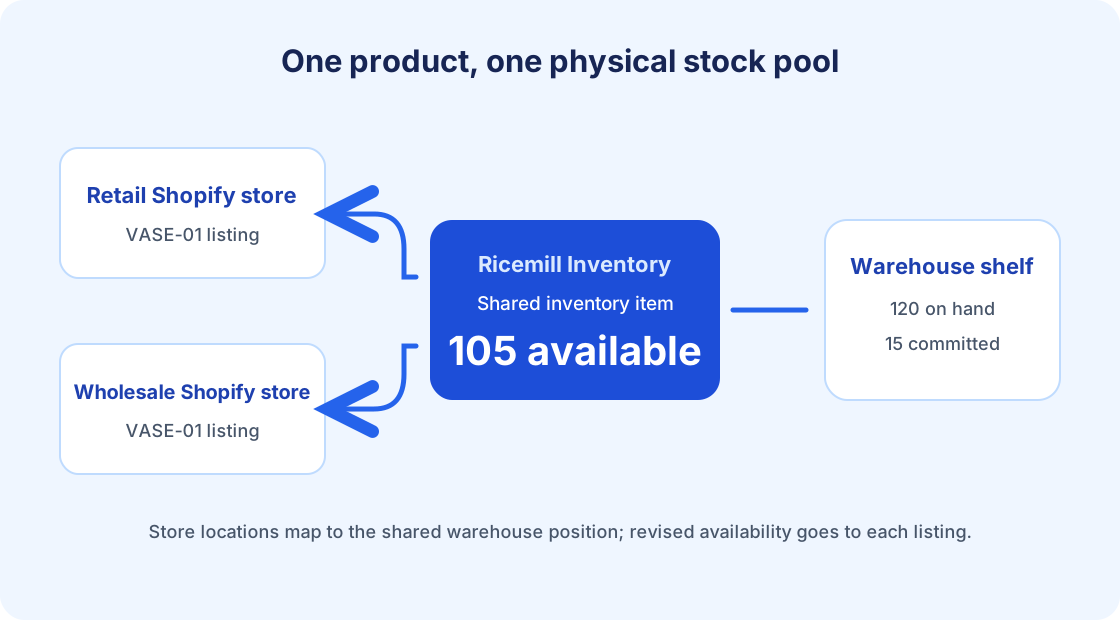
A homewares retailer runs a retail Shopify store for individual shoppers and a separate wholesale Shopify store for trade customers. The storefronts have different prices and customers, but both sell the same ceramic vase, SKU VASE-01. Every vase ships from the same warehouse shelf. Ricemill | Inventory can publish one available quantity for that SKU to both stores.
If each store treats that shelf as its own stock pool, a wholesale order can leave the retail store advertising units already claimed by that order. A spreadsheet or daily stock correction might eventually bring the numbers back together, but the next order can make them drift again. For a broader look at those day-to-day stock decisions, see our Shopify inventory management guide.
One inventory position for the shared product
In Ricemill | Inventory, each Shopify store is connected as its own channel. The vase listings can be linked to the same inventory item through their matching SKU, and the relevant Shopify locations can both map to the Ricemill location that holds the vases. The stores remain separate places to sell; the physical stock has one position in Ricemill.
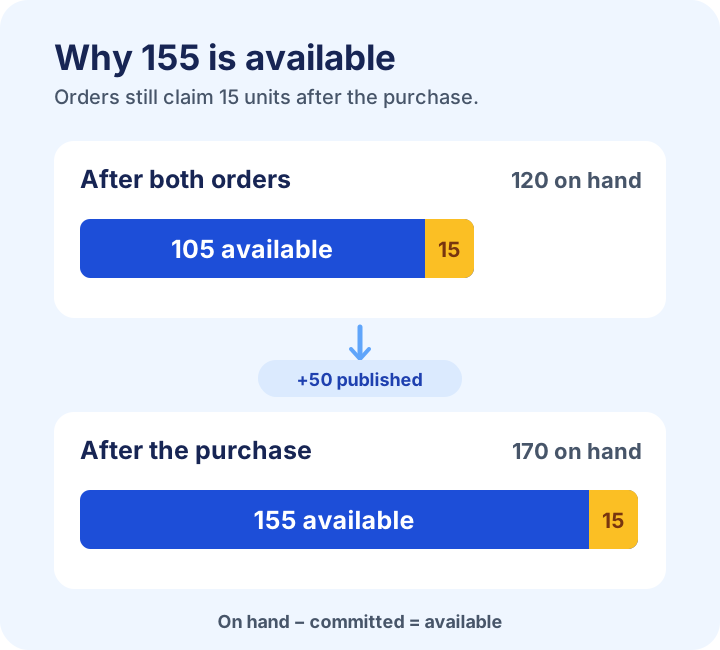
For a simple tracked item, the quantity Ricemill sends to Shopify is available stock: units on hand minus units committed to orders. That distinction matters. A new order reserves vases before the team picks and ships them, so availability falls even though the on-hand count has not yet changed.
What happens when either store makes a sale
Suppose the warehouse starts with 120 vases on hand and no open commitments. Both stores show 120 available. A wholesale customer orders 12. Once Ricemill processes that order, 12 units are committed, leaving 108 available for the connected listings. A retail customer then orders three, bringing the shared available quantity to 105.
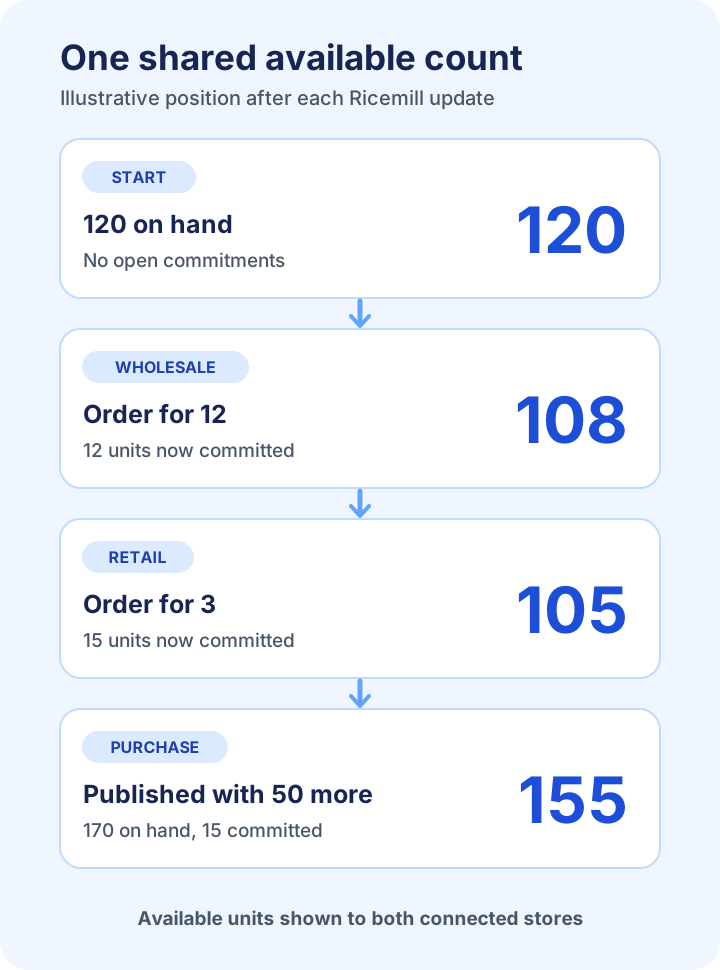
| Event | On hand | Committed | Available in Ricemill | Retail store | Wholesale store |
|---|---|---|---|---|---|
| Starting position | 120 | 0 | 120 | 120 | 120 |
| Wholesale order for 12 | 120 | 12 | 108 | 108 | 108 |
| Retail order for 3 | 120 | 15 | 105 | 105 | 105 |
| Published purchase adds 50 | 170 | 15 | 155 | 155 | 155 |
The Retail store and Wholesale store columns match Available in Ricemill because both stores receive the same published quantity after each update.
These figures illustrate the position after Ricemill has processed each change and sent the revised quantity. They do not promise a particular update time. Shopify also adjusts availability in the store where an order is placed; Ricemill publishes its calculated available quantity to the linked listings so the other store can catch up.
When a purchase adding 50 vases is published in Ricemill, on-hand stock rises to 170. The 15 units committed to existing orders are still spoken for, so the available quantity becomes 155. Both storefronts can then receive that revised number. Fulfilment later moves units out of on-hand stock and clears the corresponding commitments; it does not create another sale in this example.
Make the connection dependable
One pool also means neither storefront has a reserved share in this setup. A busy store can use units the other expected to sell; both stores share the same available quantity as it changes.
The shared position depends on the right products and locations being connected. Connect each Shopify store as its own channel, check that both vase variants track inventory in Shopify, and give them the same, specific SKU; a blank SKU or one reused for an unrelated product can prevent a reliable match. Map each storefront's selling location to the Ricemill warehouse that holds the vases. In each channel's Synchronisation settings, enable Pull orders automatically and Push inventory updates. The first brings new sales into Ricemill; the second sends the revised available quantity to the connected listings. Start with a small group of products and compare the resulting counts before connecting the rest of the catalogue.
The item's Adjustment history helps the team investigate changes to its on-hand count. If the business adds another storefront supplied by that warehouse, the same product and location checks provide a sensible starting point. Our inventory management software overview puts this workflow alongside purchasing and other stock controls.
Give it a try
Explore Ricemill | Inventory and start a 30-day free trial with a small set of shared SKUs from your Shopify stores. After a test order, open the item under Inventory: its Quantity section shows Available for the mapped warehouse. Its Order history, Purchase history and Adjustment history help explain the activity behind the count; compare the available figure with both Shopify listings after the update.