Setting up Shopify Integration
By Ricemill · Last reviewed: September 9th, 2026 · Reviewed by Chew Lim
In this article:
Mapping or Creating New Locations for Shopify Integration
Map each Shopify location to the appropriate Ricemill location before processing orders so inventory and fulfilment updates use the intended source.
Before you start: Connect the Shopify sales channel and create any required Ricemill locations. Then follow Mapping or Creating New Locations for Shopify Integration.
Fulfilment notification
Expected outcome: When enabled, Shopify sends its configured fulfilment email after Ricemill completes an order and returns its tracking information.
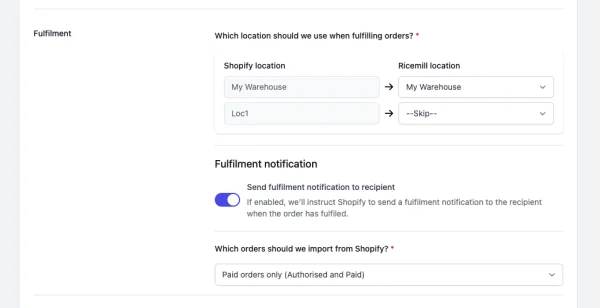
Enable "Send fulfilment notification to recipient"
If enabled, we'll instruct Shopify to send a fulfilment notification to the recipient when the order has fulfilled.
Shopify will send emails using the email templates stored in your Shopify admin.
Steps:
- Go to Integrations > Sales Channels.
- Open the Shopify channel.
- Navigate to the Settings tab.
- Under Fulfilment > Fulfilment notification, Enable Send fulfilment notification to recipient.
- Click "Save".
For the complete Shopify order-to-shipping workflow, supported carriers and plan details, see Ricemill Fulfilment.
Which orders should we import from Shopify?
Choose whether Ricemill imports only paid orders or also imports open orders with pending, authorised, partially paid or paid status.
Steps:
-
Go to Integrations > Sales Channels.
-
Open the Shopify channel.
-
Navigate to the Settings tab.
-
Under Under Fulfilment section, select option for Which orders should we import from Shopify?
- Paid orders only: Only open and unfulfilled orders with Authorised and Paid status will be download
- Pending and Paid orders: All open and unfulfilled orders with Pending, Authorised, Paid and Partially Paid status will be download
-
Click "Save".
Troubleshooting: If an order is not imported, confirm it is open and unfulfilled, then check whether its payment status is included in the selected import option. Save the channel settings after making a change.