Connect Ricemill with Shopify
Choose an inventory or shipping workflow built for Australian Shopify sellers.
How does Ricemill integrate with Shopify?
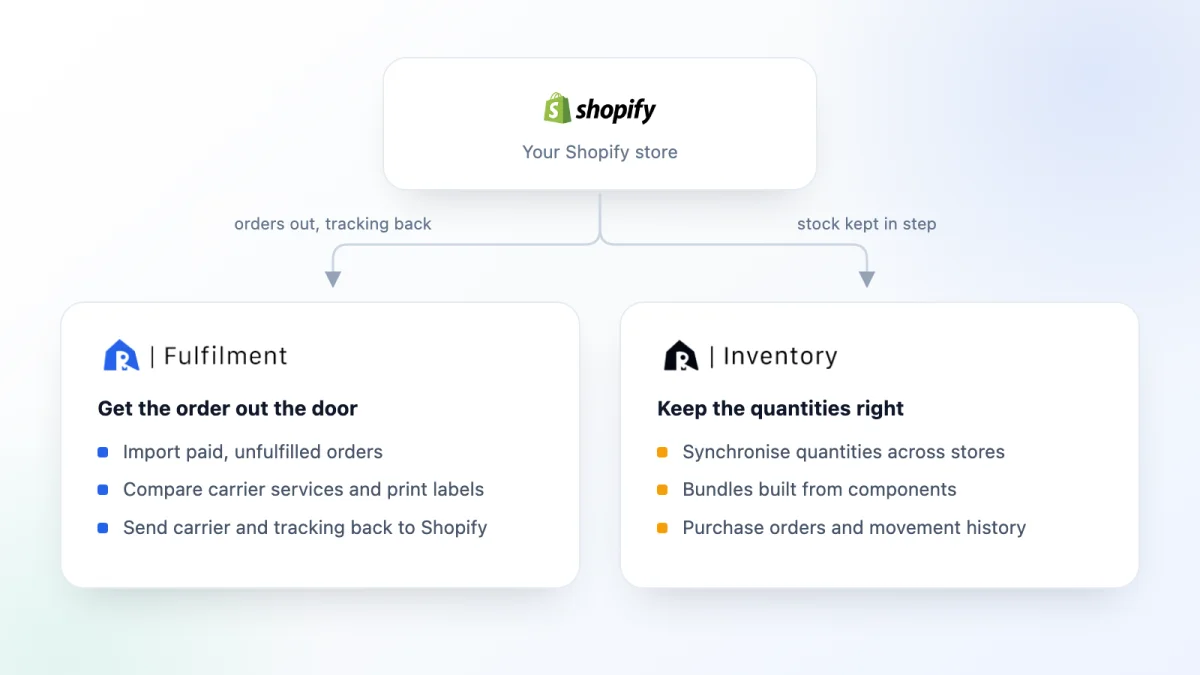
Ricemill offers two separate Shopify integrations. Ricemill Fulfilment moves order and tracking data between Shopify and supported Australian carriers. Ricemill Inventory keeps stock data aligned and adds purchasing, bundle and inventory-history workflows. Install only the app—or both apps—that matches your operations.
They are separate products with separate plans and trial terms. Most merchants start with whichever workflow is costing them time now, and add the second later if the need appears.
| Ricemill Fulfilment | Ricemill Inventory | |
|---|---|---|
| The problem it solves | Getting orders shipped and tracked | Keeping quantities accurate |
| What it reads from Shopify | Paid, unfulfilled orders | Product and stock data |
| What it sends back | Carrier, tracking number and fulfilment status | Updated quantities |
| Core workflows | Compare carrier services, print labels, split shipments | Stock synchronisation, bundles, purchase orders, movement history |
| You will also need | An account with at least one supported carrier | The channels you want kept in step |
| Typical setup | About five minutes, no developer | Connect the channels, then check the initial data |
Shopify shipping and fulfilment workflow
Ricemill Fulfilment imports paid, unfulfilled Shopify orders. You can compare services from MyPost Business, Australia Post eParcel, StarTrack Express and Aramex Australia, print labels, split shipments and send the carrier and tracking number back to Shopify. Setup usually takes about five minutes without a developer.
The round trip matters more than any individual step. An order that leaves Shopify has to return with its carrier and tracking number attached, or the customer sees a parcel marked shipped with no way to follow it. Ricemill writes that information back and marks the order fulfilled. If you enable Send fulfilment notification to recipient in the channel settings, Shopify then sends its own fulfilment email using the templates already in your Shopify admin.
Two settings are worth deciding before your first order goes through:
- Which orders to import. Choose paid orders only, or pending and paid, which also brings in open orders with pending, authorised and partially paid status. If an order never appears in Ricemill, this is the first setting to check.
- Location mapping. Map each Shopify location to the matching Ricemill location before you process orders, so fulfilment and inventory updates draw on the source you intended.
Both live under Integrations, Sales Channels, in the Shopify channel's Settings tab. The Shopify integration setup guide walks through them step by step.
You need a Shopify store and an account with at least one supported carrier. Carrier rates and postage charges remain governed by your carrier account. Review Ricemill Fulfilment or compare its plans.
Shopify inventory workflow
Ricemill Inventory synchronises quantities across connected stores, records stock movements, manages bundles and supports purchase orders. It suits merchants that need to reduce overselling risk or coordinate replenishment across one or more stores.
The value is in having one set of quantities rather than several. When the same stock is listed in more than one place, each channel keeps its own count until something reconciles them, and the gap between those counts is where overselling happens. Alongside the synchronisation itself, Ricemill keeps the movement history that explains why a number changed, the purchase orders that brought stock in, and the component maths behind any bundles you sell.
Your plan determines the available SKU, bundle and store limits. Setup includes connecting the required channels and checking the initial data before relying on automated updates. Start with a small group of products and confirm that sales, returns and manual adjustments all produce the quantities you expect before switching automation on across the catalogue.
Review Ricemill Inventory, read the inventory management software guide, or work through the practical guide to Shopify inventory management.
Which integration should you choose?
Choose Fulfilment for carrier rates, shipping labels and Shopify tracking updates. Choose Inventory for stock synchronisation, bundles and purchasing. If both workflows are important, evaluate each app independently because they have separate plans and trial terms. For shipping compatibility, see the Ricemill Fulfilment carrier integrations.
Common questions about the Shopify integration
-
Do I need both Ricemill apps?
No. They solve different problems and are installed separately. Choose Fulfilment if shipping labels and tracking updates are the bottleneck, and Inventory if quantities drift between stores. Merchants who need both evaluate each app on its own, because they have separate plans and trial terms.
-
Which Shopify orders does Ricemill Fulfilment import?
Paid, unfulfilled orders by default. You can change this to pending and paid, which also imports open orders with pending, authorised and partially paid status. The setting sits under Integrations, Sales Channels, in the Shopify channel's Settings tab.
-
What does Ricemill send back to Shopify?
Ricemill Fulfilment returns the carrier and tracking number and marks the order fulfilled. If you enable the fulfilment notification setting, Shopify then emails the customer using the templates in your Shopify admin. Ricemill Inventory writes updated quantities back to the channels you have connected.
-
Can I keep more than one store in step?
Yes, with Ricemill Inventory. It synchronises quantities across connected stores and records the stock movements behind each change, so an unexpected quantity can be traced. Your plan determines the SKU, bundle and store limits available to you.
-
How long does setup take?
Ricemill Fulfilment usually takes about five minutes and does not need a developer. Ricemill Inventory takes longer, because you connect the channels first and then check the initial data before relying on automated updates. See the Shopify integration setup guide for the individual settings.