Fulfilling orders using CouriersPlease Australia
By Ricemill · Last updated: September 25th, 2026
Fulfil your orders and print CouriersPlease Australia shipping labels
To start printing Aramex Australia shipping labels, you'll need to connect to CouriersPlease Australia.
Steps
-
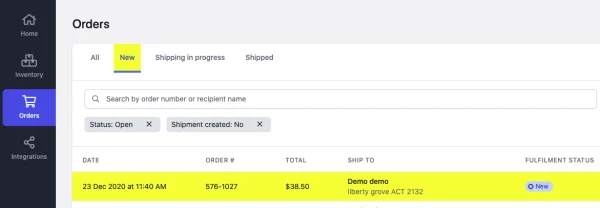
Go to Orders
-
Click on the New tab
-
Open the order you want to fulfil.
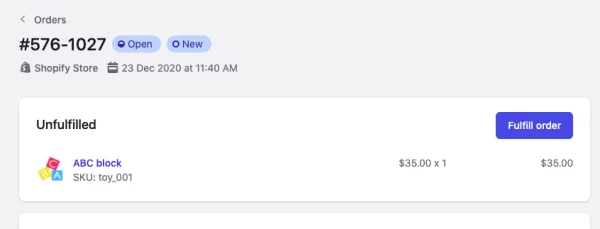
- Click on the Fulfil Order button from Unfulfiled item list.
-
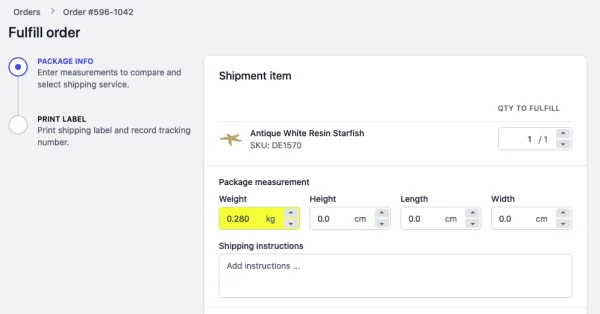
Enter item's QTY TO FULFIL.
-
Enter the Weight of your package.
-
Enter package dimensions (Height, Lenght, Width).The available rates will show after you enter the dimensions.
-
Optional: Enter Shipping Instructions, it will be printed on the shipping label.
-
Select the CouriersPlease Australia service.
-
Click on Next
-
Print the shipping label.
- This will mark the shipment as Completed and update the shipment information in Shopify.
Please note that Couriers Please does not support deleting shipments or labels via integration once they are created. Deleting a shipment in Ricemill will not remove the shipment or label in Couriers Please. You will only be charged for labels that are scanned at pickup.